Upgrading your plan
Need more tools, more seats? Upgrading takes less than a minute and you won't lose a thing.
Step 1 — Head to your profile Click your profile picture in the bottom corner of the app.
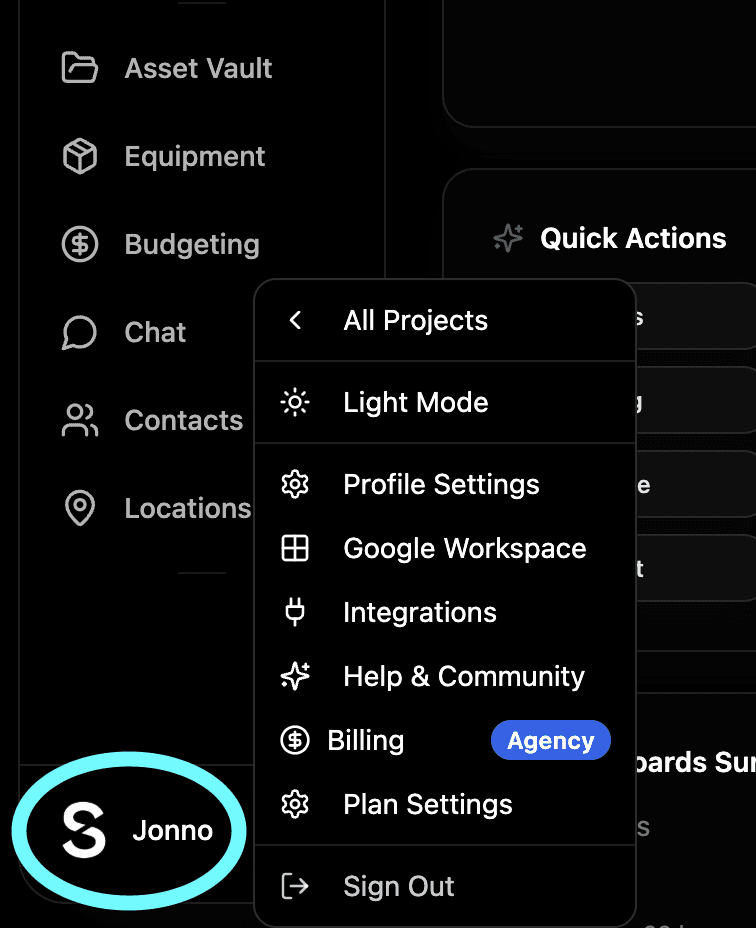
Step 2 — Go to billing Select Billing from the menu. You'll see your current plan and everything that's available to upgrade to.
Step 3 — Choose your plan Pick the plan that works for you. Indie, Pro or Studio - each one unlocks more features and seats. You can also switch to an annual plan from here to get two months free.
Step 4 — You're upgraded That's it. All your existing projects, content and team members stay exactly as they are. Nothing gets lost, nothing resets. You just get more.
Not sure which plan is right for you? Head to shotly.io/pricing for a full breakdown of what's included on each plan.
Need help? Contact us at support@shotly.io and we'll get back to you fast.