Cancelling your subscription
We're sorry to see you go. Here's everything you need to know about cancelling.
How to cancel Click your profile picture, go to Billing and select the option to cancel your subscription. You'll confirm through Stripe and your cancellation will be processed immediately.
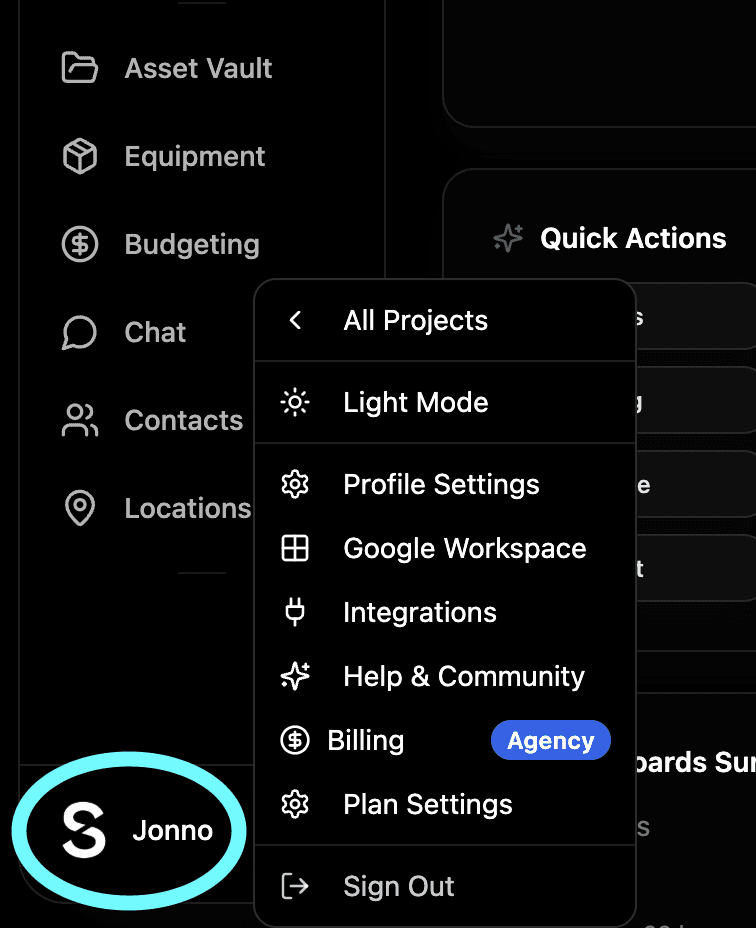
You keep access until your billing period ends Unlike downgrading, when you cancel you keep full access to your current plan right up until the end of your billing period. So if you've paid for the month you'll have the rest of that month to use everything included in your plan.

What happens after your billing period ends Once your billing period is up your account automatically drops to the free plan. You'll keep all your projects and content but you'll lose access to any features not included in free. We'd recommend exporting your call sheets, budgets, shot lists and any other important documents before your access changes.
Changed your mind? If you cancel and then decide you want to come back just head to your billing page and resubscribe. Everything will still be there waiting for you. \
Side Note - If there’s anything you’re unsatisfied with that led to your cancellation, please let us know. You can email us at Hello@shotly.io with the subject line “I’m cancelling.” We’d love to hear your feedback and see if there’s anything we can do to resolve the issue.